- Written by
BIMManager
- Posted July 3, 2013
Managers who oversee BIM models have a constant fear that the designers will include too much. That they will over-model and waste time and make the model grow too large. Fearing that someone might put too much detail into a model, some constrain the users, leaving too much out. Others have no fear of over-modeling and allow people to plow forward spending extended hours including details that never provide much ROI for the effort.
Many have written about this issue, trying to explain the level of detail needed in a BIM model. As I review and read these I come away with the impression that the bottom line seems to be… add just enough to communicate the design and get it built. This has been the standard of care in Architecture and Engineering from the distant past. Don’t put in too much and don’t put in too little. Many have written to tell you just that, but they do not tell you what “exactly” should be included and what should be left out. They have some general suggestions but nothing absolute.
Isn’t there a one stop list that everyone can use? Maybe not… Since each firm will define what is needed and try hard to get people to follow the guidelines, I can see why there is no “one size fits all”. What your firm needs is to develop is a document that defines what goes into the model, when it is added and who adds it. Each firm has to learn on its own, but they do not have to continually relearn and stumble over the process on each project.
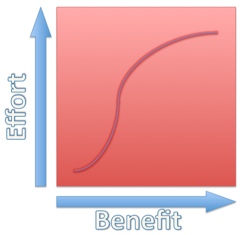 Even if a list is provided, you would have to look at it from your unique perspective and project stakeholder mix. So rather than try to give you a long list that would blindly be used and generate frustration (maybe that is why no one provides a list), I think that the process should be to create your own list. But how should that be done?
The first thing you need to do it determine your perspective. What used to be called a Level of Detail Specification is now moving toward a Level of Development Specification. You need to determine which you are going to be focused on. There is a difference. Level of Detail usually is focused on what goes INTO the model. Level of Development usually focuses on what you GET OUT of the model. Subtle difference, but it can change your document. I will not fight over the wording, but the first defines what your designers put into the model from the object level. “Do I add exhaust hoods now? Do I detail out the wall cabinets and light fixtures now? Do I grab that component model off the web and slam it into my design as is?” And the second defines what you will get out of the model and that determines what goes in. “Will I render that area? Will the Structural Engineer need that information?”
My perspective is that it is a little of both. Sometimes you have to think about individual objects and what is needed and other times you have to keep in mind the goal of what does this model need to produce. Balancing the two will give you some flexibility so as to not lock down a restrictive environment.
In 2008 the AIA developed “Document E202™ – 2008 Building Information Modeling Protocol Exhibit” a PDF example document that is helpful to use as a guideline. Take a look at it and we will continue to discuss this in a future post.